








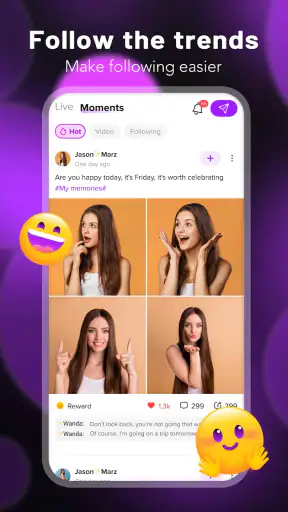
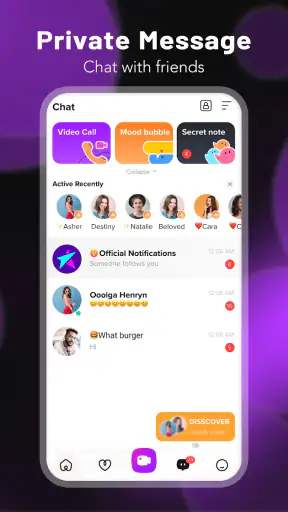
I approached LiveMe+ as a social app for people who want more than a passive feed. Its focus is live broadcasting, video chat, and chat rooms, so the main appeal is the possibility of meeting people in real time rather than waiting for replies or scrolling through polished posts. In my experience, that makes it feel more immediate than a conventional social network, but also more demanding: you need to be comfortable joining conversations, managing attention, and making sensible choices about who you interact with.
The app comes from LiveMe+ Team and is free to install, with optional purchases ranging from $0.99 to $299.99 per item. That combination is worth understanding before you begin. You can explore the service without paying, but live-social apps often place a lot of emphasis on interaction, visibility, and digital spending. I would treat the free experience as a trial period and avoid buying anything until I knew exactly what I wanted from the app.
What LiveMe+ is really like in everyday use
The easiest way to understand this app is to imagine opening it during a quiet evening and looking for a conversation rather than a specific piece of content. A live stream gives you something happening now, while video chat and chat rooms offer more direct ways to participate. That immediacy is the strongest reason to choose it over a standard messaging app.
It is also the source of the first major friction. A live community changes constantly. Some rooms may be lively, while others may not suit your interests or communication style. You are not simply selecting a finished video from a library; you are entering a social situation. That means the quality of your experience depends on timing, the people you find, and how actively you participate.
I found it more suitable for users who enjoy spontaneous conversations, casual entertainment, and meeting people from different places. It is less suitable for someone who wants a quiet, carefully filtered feed or a private messaging tool with no public-facing social pressure. If your goal is only to keep up with people you already know, a familiar messenger will probably feel simpler.
Where new users commonly get stuck
The first obstacle is usually not a complicated setting. It is knowing what to do after opening the app. A new user may expect a clear sequence such as choosing contacts, sending a message, and waiting for a reply. LiveMe+ works better when you think in terms of browsing active conversations, deciding which ones feel relevant, and then joining at your own pace.
I recommend spending the first session observing before trying to become highly visible. Watch how rooms are organized, notice whether conversations move quickly, and decide what kind of interaction feels comfortable. This simple pause helps you avoid treating every room as if it were a private conversation. It also makes it easier to leave quickly when the atmosphere is not right.
Another sticking point is the difference between watching and participating. A live stream can be enjoyable as a background activity, but the app’s social value becomes clearer when you use the chat or video elements thoughtfully. If you enter without knowing whether you want to watch, type, or speak, the interface can feel busier than expected. I get better results by choosing one purpose for each session instead of trying every option at once.
There is also a safety-related adjustment. The app carries a Mature 17+ rating, and that should influence how you approach conversations. I would not share personal contact details, a home address, workplace information, or anything that could identify your routine. The ability to connect with people worldwide is appealing, but familiarity in a chat room is not the same as trust in real life.
Setup checks that prevent avoidable frustration
Before judging the app, I would begin with the basics. The current version is 2.4.52, and it requires Android 8.0 or later. If the phone is running an older system, compatibility is the first thing to resolve rather than repeatedly reinstalling the app. On a supported device, make sure there is enough free storage and that the operating system is not struggling with several demanding apps at the same time.
Connection quality matters more here than it does in an ordinary text-based social app. Live video and real-time rooms are sensitive to unstable Wi-Fi or mobile data. If a stream pauses, voices arrive late, or video chat repeatedly drops, I first switch between a reliable Wi-Fi connection and mobile data when available. Testing another network is more useful than immediately assuming the account or app is broken.
I also suggest closing other apps before starting a video session. This is not a special LiveMe+ setting; it is a practical way to reduce competition for the phone’s memory and network attention. If the phone becomes warm or the image becomes choppy, shorten the session and try again after the device has cooled. A live app can expose general phone limitations that remain invisible during basic browsing.
Take a moment to review the app’s visible controls before joining a room. I look for ways to leave a conversation, adjust the interaction mode, and avoid accidental taps. When a service combines live content, chat, and optional purchases, learning where the main navigation and spending-related controls are located is part of responsible setup.
Because the app is free to install but includes optional purchases, I would decide on a personal spending rule before using it. The listed purchase range extends from $0.99 to $299.99 per item, so the difference between casually exploring and spending impulsively can be substantial. I would keep purchases disabled or require deliberate confirmation until the app’s value is clear to me.
A calmer workflow for finding worthwhile conversations
My preferred workflow starts with a short browsing period. I look for a room whose tone matches what I want that day, then stay long enough to understand the pace. If I am tired, I use the app more like live entertainment. If I feel social, I participate gradually instead of entering with the expectation that every conversation will become a lasting connection.
A useful, less obvious habit is to separate discovery from commitment. I might explore several rooms first, then return to the one that felt most welcoming. This avoids spending too much time trying to force a conversation that is moving too quickly or has nothing to do with my interests. It also makes the app feel less random because I am actively filtering my experience.
For video chat, I would prepare the surroundings before connecting. A quiet place, a stable phone position, and a quick check of what appears in the camera frame make a noticeable difference to comfort. This is especially important when speaking with someone new. I do not want background details, documents, or other people accidentally visible.
Chat rooms can work well when you want a lower-pressure entry point. Typing gives you more time to consider what you want to say, and it lets you leave without the awkwardness of ending a live video exchange. I see this as one of the better ways to learn the community before deciding whether video interaction is worthwhile for you.
For someone using the app to make international connections, I would keep expectations realistic. Different time zones, language habits, and conversation styles can all affect how quickly a connection develops. The worldwide audience is a useful source of variety, but it also means that a quiet period may simply reflect timing rather than a problem with the service.
How to recover when a live session goes wrong
When a stream freezes, I use a simple recovery order: leave the room, check the connection, close and reopen the app, and then try a different room. This separates a problem with one live session from a broader problem with the application. Repeating the same action in the same room rarely tells me anything useful.
If video chat fails but ordinary navigation still works, I test the connection and the phone itself before making a final judgment. Moving closer to the Wi-Fi router, switching networks, or restarting the device can resolve temporary issues. If only one conversation behaves badly while other areas work, I treat that as a session-specific problem rather than proof that the whole app is unusable.
When messages seem delayed, I avoid sending the same message repeatedly. Real-time services can catch up suddenly, which may create duplicate posts or confusing conversations. Waiting briefly, leaving the room, and returning once is a cleaner recovery method. I also check whether the issue appears in another room, because that comparison helps identify whether the problem is local to a particular session.
Unwanted interaction needs a different response. I would not argue with someone who is rude, manipulative, or pressuring me to share information or spend money. Leaving is usually more effective than trying to win the exchange. If the app presents a reporting or blocking control in the relevant area, I would use it and keep the interaction from becoming a larger part of my day.
Purchasing problems deserve patience as well. I would not repeat a purchase immediately just because the result is not visible at once. First I would check the account state, the device connection, and the relevant purchase screen, then follow the platform’s normal support route if needed. Keeping a record of what happened is more useful than making several hurried attempts.
When LiveMe+ is not the cause
It is easy to blame a live app for every interruption, but the surrounding setup often matters more. An older phone, weak signal, crowded home network, overheating battery, or aggressive background management can affect real-time video. If several apps show similar problems, I would investigate the device or network before deciding that LiveMe+ is at fault.
Privacy concerns can also be a mismatch rather than a technical failure. The app is designed around social discovery, so it may feel too open for someone who wants strictly private communication. I would choose a conventional messenger for family conversations, sensitive work discussions, or contact with people I already know. LiveMe+ makes more sense when the point is meeting and observing new people.
The Mature 17+ rating is another reason to consider who should skip it. I would not recommend it to younger users, and I would not treat the rating as a guarantee that every conversation will suit every adult. Anyone uncomfortable with unpredictable live interactions should choose a more controlled social environment.
Spending habits are equally important. Although the app costs nothing to install, optional purchases can change how you experience the service. If you tend to make quick digital purchases when you feel bored, flattered, or pressured, I would avoid adding payment details until you have a firm limit. A free download is not the same as a completely cost-free social experience.
How it compares with familiar alternatives
Compared with a standard social feed, LiveMe+ feels more immediate and less polished. That can be a strength when you want genuine, unscripted interaction, but a weakness when you want content you can consume quickly and predictably. A conventional feed is usually better for keeping up with known contacts; this app is more interesting when discovery is the main goal.
Compared with ordinary messaging apps, it offers a broader social setting but less control over who enters the conversation. Messaging is the better choice when privacy, reliability, and a known contact list matter most. LiveMe+ is the better fit when you want to browse active rooms and decide whether to engage with unfamiliar people.
Compared with video meeting tools, the app is more casual and socially exploratory. It is not where I would organize a serious meeting, teach a structured lesson, or coordinate a work session. Its value comes from informal live presence, not from formal scheduling or professional collaboration.
That distinction helps explain the average rating of 3.7 from around 9.9 thousand ratings. I would read that as a sign of a mixed but meaningful experience: the concept works for people who enjoy live social discovery, while others may find the pace, unpredictability, or purchase model uncomfortable. The app has also passed one million installs, so it is not an obscure experiment, but popularity alone does not make it the right social space for every user.
Who will get the most from it
I think LiveMe+ is strongest for an adult who enjoys spontaneous interaction and does not need every conversation to become a close friendship. It can fill a quiet evening, provide a way to practice casual conversation, or introduce you to perspectives outside your usual circle. The best users are curious, patient, and willing to leave rooms that do not feel worthwhile.
It can also suit someone who prefers a gradual path into socializing. Start by watching, move to text chat, and only then consider video interaction. This staged approach is more comfortable than treating the app as a performance space from the first minute. It also gives you time to learn which types of rooms match your interests.
I would skip it if you want a carefully moderated, predictable environment, a private contact list, or a social app with no temptation to spend. I would also skip it if your phone or connection struggles with live video and you are unwilling to troubleshoot the basics. In those cases, text-first services or established private messengers are likely to be less frustrating.
My practical verdict after using the app
LiveMe+ is a free social app with a clear live-first identity. I like that it gives users several levels of participation, from watching streams to joining chat rooms and moving toward video chat. That flexibility makes it easier to find a comfortable starting point, especially when meeting unfamiliar people feels intimidating.
Its weaknesses are tied to the same design. Live interaction can be inconsistent, network problems are more noticeable, and the open social setting requires stronger personal boundaries than a private messenger. The optional purchase range also means I would approach the app with a spending limit already decided.
My recommendation is to install it only if you genuinely want real-time social discovery. Begin with observation, test the app on a stable connection, keep personal details private, and use a gradual workflow instead of chasing every room. For adults who enjoy spontaneous conversations, it can be an engaging way to spend time. For users seeking quiet browsing, dependable private messaging, or a tightly controlled community, another type of social app will be a better choice.


